Java Maps
In Unit 1 you worked with the Collection hierarchy: List, Set, and SortedSet. This lecture introduces the second half of the Java Collections Framework, the Map hierarchy, which stores data as key to value pairs instead of as single elements.
If you would like a refresher on Lists and Sets first, see the Java Collections Library lecture from Unit 1.
By the end of this lecture you should be able to:
- Explain how a
Mapdiffers from aListor aSet. - Describe the difference between a
Mapand aSortedMap. - Create, add to, display, look up in, and iterate over a
Map. - Choose between a
Mapand aSortedMap, and judge whether a map an AI tool suggested is a good fit.
Where Maps Fit
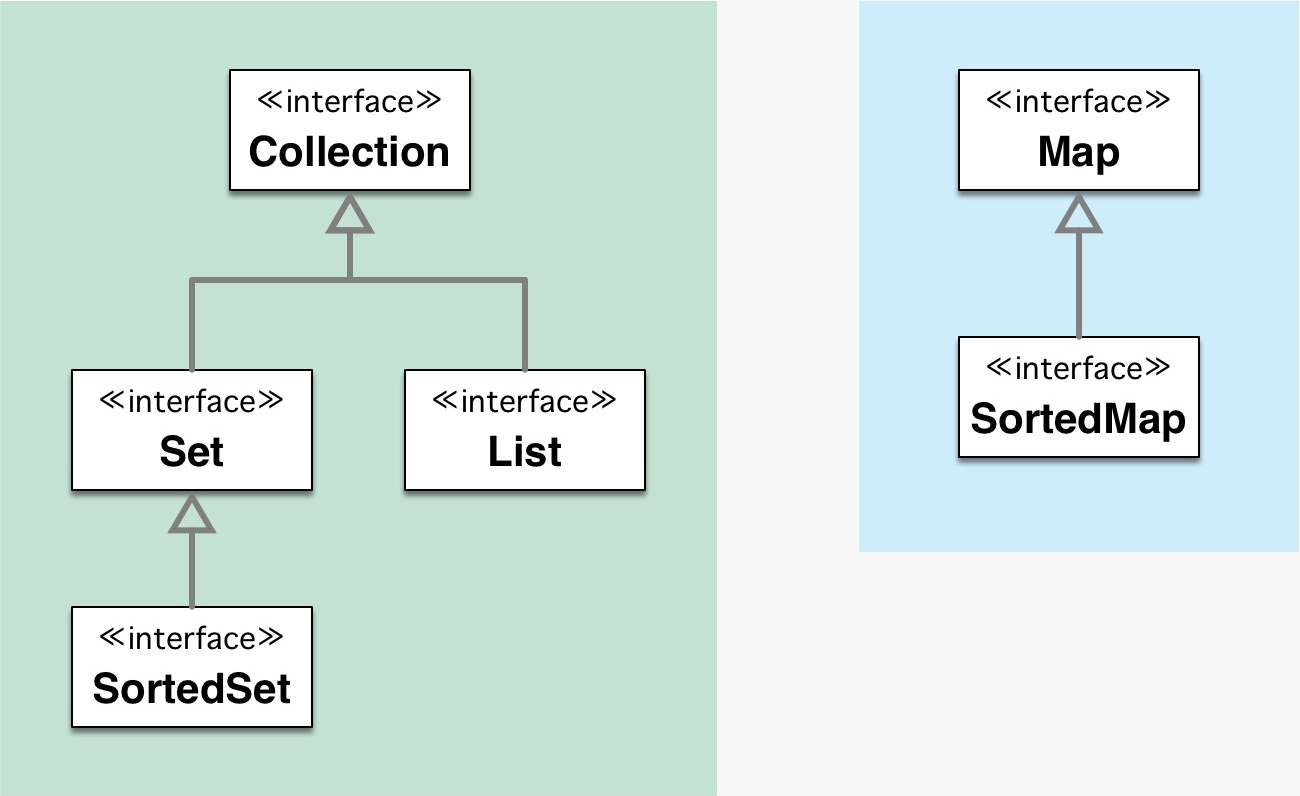
Interface hierarchy summary
The Java Collections Framework has two separate hierarchies. You already know the first, rooted at Collection. The second is rooted at Map, which represents key to value mappings:
Maprepresents a set of key to value pairs. A map cannot contain duplicate keys.SortedMapextendsMap. A SortedMap keeps its keys in sorted order.
Map is a separate hierarchy from Collection because a map is not a simple group of individual elements. It holds pairs of keys and values, so it uses its own methods (put and get) rather than the add and contains you used with Lists and Sets.
Definitions
Map
- A collection that maps keys to values.
- A map cannot contain duplicate keys.
- A key can map to one and only one value.
- A map can contain duplicate values.
- A map's keys are not in a predictable or guaranteed order.
SortedMap
- A collection that maps keys to values.
- A sorted map cannot contain duplicate keys.
- A key can map to one and only one value.
- A sorted map can contain duplicate values.
- A sorted map's keys are continuously sorted by their natural order or by a custom order.
API
The full reference is the Java 21 API documentation. Bookmark it. You will use it constantly.
The primary methods for the Map interface:
boolean containsKey(Object key)returnstrueif the key is present.Set<Map.Entry<K,V>> entrySet()returns the key and value pairs as a set.V get(Object key)returns the value stored for a key, ornullif the key is absent.Set<K> keySet()returns the keys as a set.V put(K key, V value)stores a value under a key and returns the previous value, if any.int size()returns the number of key and value pairs.
Concrete Implementations
An interface describes what a collection does. A concrete class describes how it does it. You program to the interface but create an instance of a concrete class. Each map interface has one common implementation you will use most often:
| Interface | Common implementation | Behavior |
|---|---|---|
Map |
HashMap |
Key to value, keys in no predictable order |
SortedMap |
TreeMap |
Key to value, keys kept in natural sorted order |
Maps
A Map is different from a List or a Set. Instead of holding single elements, it stores pairs: each key is associated with one value. You look values up by their key. Because a Map is not a Collection, it uses its own methods (put and get) rather than add.
Create a Map
// Legacy (Java 4 and earlier), avoid this
Map map = new HashMap();

// Current (Java 5+). The two type parameters are the key type and the value type.
Map<String, Integer> map = new HashMap<>();
In Map<String, Integer>, the keys are String objects and the values are Integer objects. Here we are mapping a name to an age.
Add to a Map
Use put(key, value) to add an entry. If you put a key that already exists, the new value replaces the old one, because a key can map to only one value.
Map<String, Integer> map = new HashMap<>();

map.put("one", 1);
map.put("two", 2);
map.put("three", 3);
Display a Map
Getting a quick view of a Map, just like a list or a set.
System.out.println(map);
Example output
{one=1, two=2, three=3}
Notice that a Map prints with curly braces { } and shows each pair as key=value.
HashMap key order is not guaranteed
A HashMap makes no promise about the order of its keys, so the order you see when you print one may differ from the example above. If you need the keys in a predictable, sorted order, use a TreeMap (a SortedMap) instead.
Looking up a value
The whole point of a Map is fast lookup by key. Use get(key) to retrieve the value for a key.
Integer value = map.get("two");
System.out.println(value);
Output
2
Iterating through a Map
A Map holds two things per entry, a key and a value, so iterating is slightly different. The most common approach is to loop over entrySet(), where each entry gives you both the key and the value.
// Enhanced for-loop over the entries (Java 5+), use this!
for (Map.Entry<String, Integer> entry : map.entrySet()) {
    System.out.println(entry.getKey() + " = " + entry.getValue());
}
Output
one = 1
two = 2
three = 3
Other ways to iterate a Map
If you only need the keys, loop over keySet(). If you only need the values, loop over values().
// Keys only
for (String key : map.keySet()) {
    System.out.println(key);
}

// Values only
for (Integer value : map.values()) {
    System.out.println(value);
}
Complete Map demo
package java112.labs2;

import java.util.*;

/**
 * class MapDemo
 *
 */
public class MapDemo {

    public void run() {

        Map<String, Integer> map = new HashMap<>();

        map.put("one", 1);
        map.put("two", 2);
        map.put("three", 3);

        System.out.println(map);
        System.out.println();

        System.out.println("Look up a single value by key");
        System.out.println("two = " + map.get("two"));
        System.out.println();

        System.out.println("Enhanced for-loop over the entries (Java 5+)");
        for (Map.Entry<String, Integer> entry : map.entrySet()) {
            System.out.println(entry.getKey() + " = " + entry.getValue());
        }

    }

    public static void main(String[] args) {
        MapDemo demo = new MapDemo();
        demo.run();
    }
}
Try it
Run MapDemo as written, then change HashMap to TreeMap and run it again. Compare the order of the keys in the output. This is the difference between a Map and a SortedMap in action.
Going further
For a larger example that uses a TreeMap with a custom value class, see the TreeMap Demo.
Which Collection Should I Use?
Now that you know maps, here is the full picture across both hierarchies. Choosing a Collection is a design decision. The right choice depends on the nature of the data you are storing and how your program needs to use it.
| If you need... | Use... | Example |
|---|---|---|
| Items in insertion order, duplicates allowed | List / ArrayList |
Lines read from a file, a to-do list |
| Unique items only, order does not matter | Set / HashSet |
Distinct words found in a document |
| Unique items in sorted order | SortedSet / TreeSet |
Vocabulary words listed alphabetically |
| Look up a value by key | Map / HashMap |
Word to count, student ID to name |
| Look up values by key and keep keys in sorted order | SortedMap / TreeMap |
Word counts listed in alphabetical key order |
Quick Decision Checklist
Work through these questions when you are unsure which Collection to reach for:
- Do I need to look something up by a key? If yes, use a
MaporSortedMap. - Do I need duplicates? If yes, use a
List. If no, use aSetorSortedSet. - Does order matter? If insertion order matters, use a
List. If sorted order matters, use aSortedSetorSortedMap. - Does the data need to stay sorted automatically? If yes, use a
TreeSetorTreeMap.
Evaluating an AI suggestion
When an AI tool hands you code that uses a collection, run it through this same checklist. Ask whether the type it chose actually matches the requirements: does the data really allow duplicates, does order matter, and is a lookup by key involved? A tool will often default to ArrayList or HashMap even when a Set or a sorted type would be a better fit. Your job is to catch that.