Java Input and Output
No matter where the data is coming from or going to and no matter what its type, the algorithms for sequentially reading and writing data are basically the same:
- Reading
- open a stream
- while more information
- read information
- close the stream
- Writing
- open a stream
- while more information
- write information
- close the stream
The java.io package contains a collection of stream classes that support these algorithms for reading and writing. To use these classes, a program needs to import the java.io package. The stream classes are divided into two class hierarchies, based on the data type (either characters or bytes) on which they operate.
Character Streams
Reader and Writer are the abstract superclasses for character streams in java.io. Reader provides the API and partial implementation for readers - streams that read 16-bit characters and Writer provides the API and partial implementation for writers—streams that write 16-bit characters. Subclasses of Reader and Writer implement specialized streams and are divided into two categories: those that read from or write to data sinks (shown in gray in the following figures) and those that perform some sort of processing (shown in white). The figure shows the class hierarchies for the Reader and Writer classes Most programs should use readers and writers to read and write textual information. The reason is that they can handle any character in the Unicode character set, whereas the byte streams are limited to ISO-Latin-1 8-bit bytes.
Reader Class Hierarchy
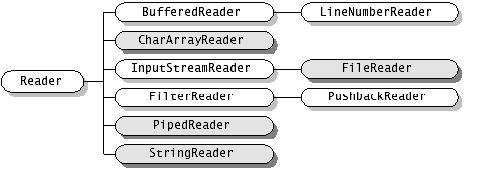
Reader class hierarchy summary
Readeris the abstract base class for all character input streams.- Direct subclasses of
Reader: BufferedReaderreads text efficiently by buffering input. Its subclassLineNumberReaderalso tracks the current line number.CharArrayReaderreads from a character array in memory.InputStreamReaderbridges byte streams to character streams. Its subclassFileReaderreads characters from a file on disk. This is the class you will use most often.FilterReaderis the base class for filtered readers. Its subclassPushbackReaderallows characters to be pushed back into the stream after reading.PipedReaderreads from a piped character stream, used for communication between threads.StringReaderreads from aStringin memory.
Writer Class Hierarchy
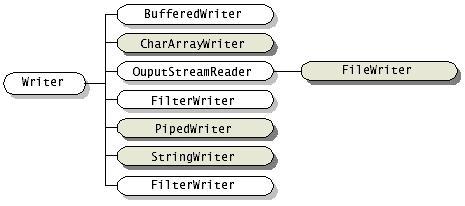
Writer class hierarchy summary
Writeris the abstract base class for all character output streams.- Direct subclasses of
Writer: BufferedWriterwrites text efficiently by buffering output.CharArrayWriterwrites to a character array in memory.OutputStreamWriterbridges character streams to byte streams. Its subclassFileWriterwrites characters to a file on disk. This is the class you will use most often for file output.FilterWriteris the base class for filtered writers.PipedWriterwrites to a piped character stream, used for communication between threads.StringWriterwrites to aStringbuffer in memory.
Using Streams - Input
The most common way to read from a file on disk:
This works just fine:
FileReader reader = new FileReader("testFile.txt");

BufferedReader in = new BufferedReader(reader);
This is usually coded like this, in nested constructors:
BufferedReader in = new BufferedReader(new FileReader("testFile.txt"));
However! There’s an issue. This code won’t compile because the compiler requires exception handling. Wha? Let’s look at the Java API for these constructors.
public void run() {
    BufferedReader  in = new BufferedReader(new FileReader("testFile.txt"));
}
Java SE 21 API: BufferedReader
If the compiler requires it, we have to do it. We’ll look at exception handling more a bit later. We also need to declare the BufferedReader out of the try so it can be closed in the finally block.
BufferedReader inputReader = null;
try {
    inputReader = new BufferedReader(new FileReader("testFile.txt"));

    // code to process the input file

} catch (FileNotFoundException fileNotFound) {
    System.out.println("There was a problem finding the file.");
    fileNotFound.printStackTrace();
} catch (IOException inputOutputException) {
    System.out.println("There was a problem reading the file.");
    inputOutputException.printStackTrace();
} catch (Exception exception) {
    System.out.println("There was a problem.");
    exception.printStackTrace();
} finally {
    try {
        if (inputReader != null) {
            inputReader.close();
        }
    } catch (Exception exception) {
        System.out.println("There was a problem closing the BufferedReader.");
        exception.printStackTrace();
    }
}
Once the file is opened you will need to read the contents. We do this in a loop and read one line at a time. Here’s what the while loop will look like. (This will go inside the try block above.)
while (inputReader.ready()) {
    // read each line in here
}
Each line of the file is read with this code.
// Declare a String variable to hold the current line
    String line = null;

//  ...

// Inside the while loop
    line = inputReader.readLine();
Put it all together and you get this.
BufferedReader inputReader = null;
try {
    inputReader = new BufferedReader(new FileReader("testFile.txt"));

    // code to process the input file

    // Declare a String variable to hold the current line
    String line = null;

    while (inputReader.ready()) {
        // read each line in here
        line = inputReader.readLine();

        // now process the line in some way
        // this will usually be in another method that
        // we pass the line to.
    }

} catch (FileNotFoundException fileNotFound) {
    System.out.println("There was a problem finding the file.");
    fileNotFound.printStackTrace();
} catch (IOException ioException) {
    System.out.println("There was a problem reading the file.");
    ioException.printStackTrace();
} catch (Exception exception) {
    System.out.println("There was a problem.");
    exception.printStackTrace();
} finally {
    try {
        if (inputReader != null) {
            inputReader.close();
        }
    } catch (Exception exception) {
        System.out.println("There was a problem closing the BufferedReader.");
        exception.printStackTrace();
    }
}
AI and I/O code
When you ask an AI tool to write file-reading code, it will almost always use try-with-resources (shown on the next page). That's fine, but you need to understand the BufferedReader + finally pattern first. If you can't read the old form, you can't debug what the AI wrote or explain it in a code review.
Using Streams - Output
For writing to a file we will need three objects.
FileWriter fileWriter = new FileWriter("output.txt");
BufferedWriter bufferedWriter = new BufferedWriter(fileWriter);
PrintWriter outputWriter = new PrintWriter(bufferedWriter);
You'll never see it that way and we need to get used to nested constructors.
//FileWriter fileWriter = new FileWriter("output.txt");
//BufferedWriter bufferedWriter = new BufferedWriter(fileWriter);
//PrintWriter outputWriter = new PrintWriter(bufferedWriter);

PrintWriter outputWriter = new PrintWriter(new BufferedWriter(new FileWriter("output.txt")));
Here's the full code. Notice that we have two catch blocks, not three as in the reader above.
PrintWriter outputWriter = null;
try {
    outputWriter = new PrintWriter(new BufferedWriter(new FileWriter("output.txt")));

    outputWriter.println("Sample output.");
} catch (IOException inputOutputException) {
    System.out.println("There was a problem writing to the file.");
    inputOutputException.printStackTrace();
} catch (Exception exception) {
    System.out.println("There was a problem.");
    exception.printStackTrace();
} finally {
    try {
        if (outputWriter != null) {
            outputWriter.close();
        }
    } catch (Exception exception) {
        System.out.println("There was a problem closing the PrintWriter.");
        exception.printStackTrace();
    }
}
Further Readings
I/O in Java
- Head First Java 3rd Edition: Chapter 11 (2nd Edition: Chapter 16)
- Oracle IO Tutorial
Exception Handling
- Head First Java 3rd Edition: Chapter 13 (2nd Edition: Chapter 11)
- Tutorialspoint Exception Handling Tutorial
- Oracle Exception Handling Tutorial